Understanding site to site vpns

Understanding Site to Site VPNs: Comprehensive Guide to Understanding Site-to-Site VPNs, IPsec VPNs, and Global Connectivity
Understanding Site to Site VPNs is all about how two or more networks securely connect over the internet as if they were on the same private network. Quick fact: a properly configured site-to-site VPN uses encryption, authentication, and tunneling to protect traffic between locations. In this video guide, you’ll get a practical, hands-on overview that covers setup, use cases, architecture, and best practices. I’ll walk you through how site-to-site VPNs differ from remote access VPNs, common protocols, and real-world scenarios you’ll actually encounter.


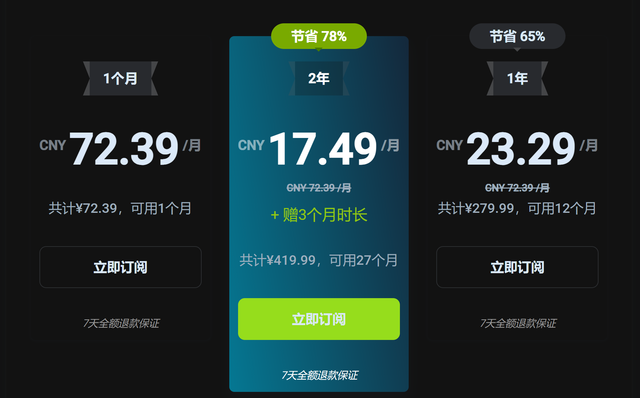

| VPN | Obfuscation | From / month | Plan | Free plan | Refund | Alipay | UnionPay | Crypto | Website opens in China | Trustpilot | |
|---|---|---|---|---|---|---|---|---|---|---|---|
 ZoogVPN | Turn on manually Shadow | $2.49/mo | 27 months: $59.99 | Yes | 7 days | ✓ | ✓ | ✓ | ✓ | Official site blocked; our special link opens (4.4 s) | 4.2/5 (195 reviews) |
 NordVPN | Turn on manually Obfuscated Servers / NordWhisper | $3.49/mo | 27 months: $94.23 | No | 30 days | ? | ✗ | ✓ | ✓ | ✗ Blocked | 4.2/5 (51,628 reviews) |
 ExpressVPN | ✓ On by default all servers | $3.00/mo | 28 months: $84 | No | 30 days | ✗ | ✗ | ✓ | ✗ | ✗ Blocked | 4.4/5 (29,706 reviews) |
 Surfshark | ✓ On by default Camouflage, with OpenVPN | See site | See site | No | 30 days | ✗ | ✗ | ✗ | ✓ | ✗ Blocked | 4.3/5 (31,823 reviews) |
 Proton VPN | Turn on manually Stealth, free plan too | $2.99/mo | 12 months: $35.88 | Yes | 30 days | ✗ | ✗ | ✗ | ✓ | ✗ Blocked | 2.1/5 (1,040 reviews) |
 Astrill VPN | Turn on manually StealthVPN / OpenWeb | $12.50/mo | 24 months: $300 | No | See site | ✗ | ✗ | ✗ | ✓ | ✗ Blocked | 1.3/5 (110 reviews) |
 Private Internet Access | Turn on manually Shadowsocks, OpenVPN only | $2.03/mo | 40 months: $81.2 | No | 30 days | ✗ | ✗ | ✗ | ✗ | ✗ Blocked | 4.2/5 (11,033 reviews) |
 CyberGhost | Turn on manually selected servers | $2.19/mo | 28 months: $61.32 | No | 45 days | ✗ | ✗ | ✗ | ✓ | ✗ Blocked | 4.0/5 (24,178 reviews) |
 PureVPN | Turn on manually switch to OpenVPN | $1.69/mo | 60 months: $101.55 | No | 31 days | ? | ? | ✗ | ✓ | ✗ Blocked | 4.4/5 (17,994 reviews) |
 AdGuard VPN | ✓ On by default TrustTunnel | $2.99/mo | 24 months: $71.76 | Yes | 30 days | ✓ | ✗ | ✓ | ✓ | Official site blocked; our special link opens (3.7 s) | 4.3/5 (290 reviews) |
 Mullvad | Turn on manually QUIC / Shadowsocks / LWO | $5.61/mo | €5/mo | No | 14 days | ✗ | ✗ | ✗ | ✓ | ✗ Blocked | 3.2/5 (192 reviews) |
 Windscribe | Turn on manually Stealth / WStunnel | $5.75/mo | 12 months: $69 | Yes | See site | ✗ | ✗ | ✗ | ✓ | ✗ Blocked | 4.7/5 (13,355 reviews) |
 StrongVPN | Turn on manually Scramble, OpenVPN TCP | See site | See site | No | 30 days | ✓ | ✗ | ✗ | ✗ | ✗ Blocked | 4.4/5 (2,695 reviews) |
 LightXtreme 闪连 | Not listed | $7.08/mo | 12 months: $84.99 | Yes | 30 days | ✓ | ✓ | ✓ | ✓ | ✓ Yes (3.5 s) | No page |
Prices checked 2026-11-10 on each vendor's pricing page (cheapest long plan, USD). Check the vendor's checkout for the final price.
Obfuscation checked 2026-11-14 on each vendor's site and help center: "on by default" = nothing to set; "turn on manually" = switch protocol or mode in settings; "not listed" = the vendor describes no obfuscation.
Payment methods checked 2026-11-10 on each vendor's payment pages: all 14 take cards and PayPal; ✗ = not listed, ? = the vendor's own pages disagree.
China access: whether the official website opens from mainland China networks (tests the website only, not the VPN connection). Last checked 2026-11-18 01:02 Beijing time.
Trustpilot score and review count checked 2026-11-10.
Why this matters
- Businesses with multiple offices need secure, reliable connections without expensive dedicated lines.
- A good site-to-site VPN can scale with your growing network, allowing secure branch office access, data center interconnects, and cloud migrations.
- You’ll learn how to plan, implement, monitor, and troubleshoot to minimize downtime and exposure.
What you’ll learn in this video
- The core concept and components of site-to-site VPNs
- Differences between IPsec, SSL/TLS, and other tunneling methods
- Typical architectures: hub-and-spoke vs. mesh
- Step-by-step basics for initial configuration and testing
- Security best practices, including encryption, authentication, and firewall rules
- Common pitfalls and troubleshooting tips
- Real-world use cases across different industries
Useful resources and quick-reference URLs text only Apple Website - apple.com, Artificial Intelligence Wikipedia - en.wikipedia.org/wiki/Artificial_intelligence, Internet Engineering Task Force - www.ietf.org, OpenVPN - openvpn.net, Cisco VPN - www.cisco.com, Palo Alto Networks - www.paloaltonetworks.com, Fortinet - www.fortinet.com, Juniper Networks - www.juniper.net, Microsoft VPN - support.microsoft.com
Table 1 — Architectures and Traffic Flow
| Architecture | Centralization | Traffic Pattern | Latency Implication | Complexity | Suitable For |
|---|---|---|---|---|---|
| Hub-and-Spoke | Central hub controls policy | All traffic may route through hub | Higher if hub bottleneck | Moderate | 3–5 sites, centralized control |
| Mesh | Direct site-to-site | Local or inter-site traffic per pair | Lower latency between sites | Higher | 6+ sites, diverse traffic pairs |
| Hybrid (Hub + Partial Mesh) | Mixed control | Some local, some hub-routed | Moderate | Moderate | Mixed environments |
| Full Mesh (Every site peered) | Fully decentralized policy | Direct site pairs | Lowest for local pairs | High | Small networks with many relationships |
Compiled November 2026; check the provider's site for current details.
What is a Site-to-Site VPN?
A site-to-site VPN creates a secure, encrypted tunnel between two or more networks over the public internet. Rather than each device connecting individually remote access, the entire networks trust each other as if they were directly connected. Think of it as a private highway between two campuses or data centers.
Key components
- VPN gateways: devices at each site that establish and maintain the tunnel
- Tunnel/transport protocol: the rules for how data travels securely IPsec is the most common
- Encryption and authentication: ensures only authorized traffic passes
- Routing: determines which packets go through the VPN tunnel
- NAT and firewall rules: allow legitimate traffic while protecting the network
Common architectures
- Hub-and-spoke: a central hub site connects to multiple spoke sites
- Full mesh: every site peers with every other site best for small numbers of sites
How IPsec Site-to-Site VPNs Work
IPsec VPNs are the workhorse for site-to-site connections. They provide confidentiality, integrity, and authentication for traffic between sites.
- Phase 1 IKE: establishes a secure channel for negotiating Phase 2
- Phase 2 IPsec: negotiates the actual data encryption and integrity
- Tunneling modes: transport vs. tunnel tunnel is typical for site-to-site
- Key exchange: pre-shared keys or certificates
Benefits and considerations
- Strong security with AES-256 and authenticated encryption
- Scales well for multiple sites with proper routing
- Requires careful configuration of peers, policies, and NAT traversal
Table 2 — Protocols and Variants Suitability
| Protocol/Variant | Security Feature | Compatibility | Complexity | Preferred Use |
|---|---|---|---|---|
| IPsec | Encryption, integrity, authentication | Broad device support | Moderate | Site-to-site core |
| DMVPN | Dynamic tunnels, scalable hub-spoke | Cisco-centric, scalable | Higher | Large deployments with dynamic sites |
| GRE over IPsec | Subnet routing flexibility | Some devices; broader routing | Moderate to High | Complex topologies needing routing flexibility |
| SSL/TLS VPN (site-to-site in some setups) | TLS-based security | Limited for site-to-site | Moderate | Remote access-like site ties |
| WireGuard | Simple, fast protocol | Growing device support | Lower | Lightweight, modern stacks |
Compiled November 2026; check the provider's site for current details.
Protocols and Variants to Know
- IPsec: standard for site-to-site, works with many devices Cisco, Fortinet, Juniper, etc.
- GRE over IPsec: adds routing flexibility for multiple subnets
- DMVPN Dynamic Multipoint VPN: dynamic, scalable hub-and-spoke model
- SSL/TLS-based VPNs: often used for remote access but can be used for site-to-site in some setups
- WireGuard: newer, lightweight protocol gaining traction for simpler deployments
When to use which
- Large enterprises with many sites: IPsec with DMVPN or a full mesh
- Branch offices with dynamic needs: DMVPN or a cloud-managed VPN service
- High-speed, low-latency requirements: consider WireGuard-based solutions if compatible
Architectures: Hub-and-Spoke vs Mesh
Hub-and-spoke Telus tv not working with vpn heres your fix and other VPNs tips for Telus TV
- Pros: centralized control, easier policy management
- Cons: traffic may go through the hub, potential bottleneck
Mesh
- Pros: direct site-to-site traffic, lower latency between sites
- Cons: higher complexity, more policies to manage
Choosing the right model
- Number of sites: 3–5 sites often works well with hub-and-spoke; 6+ benefits from mesh
- Traffic patterns: if most traffic stays local to pairs of sites, mesh may be better
- Management capability: consider your IT team’s capacity to manage multiple tunnels and routes
Security Best Practices
- Use strong encryption: AES-256 or higher, with authenticated encryption AES-GCM
- Enable perfect forward secrecy PFS to protect past sessions
- Use certificates for authentication whenever possible
- Implement strict access controls on gateways and management interfaces
- Regularly update firmware and apply security patches
- Use intrusion prevention and firewall rules to control traffic across the tunnel
- Segment networks behind VPNs where practical to minimize lateral movement
Configuration Essentials: A Practical Walkthrough
Note: This is a high-level guide you can adapt to your vendor and device.
- Define networks
- Local networks at Site A and Site B e.g., 192.168.1.0/24 and 192.168.2.0/24
- Choose gateways
- Ensure devices support IPsec, NAT traversal, and encryption standards
- Establish phase 1 parameters
- Encryption: AES-256
- Hash: SHA-256
- DH Group: 14 2048-bit or higher
- IKE version: IKEv2 preferred for better security and stability
- Establish phase 2 parameters
- Protocol: ESP
- Encryption: AES-256-GCM
- PFS: enabled Diffe-Hellman group 14 or higher
- Perfect forward secrecy: on
- Authentication
- Use certificates if possible; otherwise, pre-shared keys with strong length and rotation policies
- Routing and NAT
- Create static or dynamic routing rules for traffic across the VPN
- Decide how NAT should be handled for internal hosts vs. VPN traffic
- Firewall rules
- Allow only necessary subnets and ports through the VPN
- Block unsolicited inbound traffic from the internet toward VPN gateways
- Monitoring and logging
- Enable VPN-specific logs, monitor uptime, tunnel status, and throughput
- Set up alerting for tunnel down events or authentication failures
Performance and Capacity Planning
- Bandwidth needs: ensure gateways can handle peak site-to-site traffic
- Latency sensitivity: critical apps like VoIP or real-time video may require QoS
- MTU and fragmentation: adjust MTU to prevent packet fragmentation across the tunnel
- Redundancy: consider dual gateways and automatic failover
Typical performance metrics
- Latency: usually under a few milliseconds for campus-to-campus links, higher across WANs
- Jitter: aim for low jitter to avoid stream disruptions
- Packet loss: target below 0.1% for most applications
- Uptime: target 99.9%+ with automated failover
Remote Access vs Site-to-Site VPN: Quick Comparison
- Remote access VPN: individual users connect to a central network; flexible for mobile workers
- Site-to-site VPN: networks connect to each other; devices on both ends can communicate as if directly connected
- Remote access is user-centric; site-to-site is network-centric
- Both can co-exist in a well-designed enterprise network
Cloud and Hybrid Scenarios
- Cloud VPN gateways: connect on-prem networks to cloud VPCs AWS/VPC, Azure VNets, Google Cloud VPN
- Direct interconnects: dedicated connections between data centers and cloud providers
- Hybrid setups: a mix of on-prem, cloud, and partner networks all connected via site-to-site VPNs
Table 3 — Security Best Practices Checklist
| Practice | Implemented (Yes/No) | Typical Benefit | Key Consideration | Notes |
|---|---|---|---|---|
| AES-256 or higher | Yes | Strong confidentiality | Ensure device support | Preferred encryption |
| Authenticated encryption (AES-GCM) | Yes | Data integrity | Firmware compatibility | Required for AEAD |
| Perfect Forward Secrecy (PFS) | Yes | Past session secrecy | Crypto policy on peers | Use with certificates |
| Certificates for auth | Yes | Scalable, revocation | PKI management | Prefer over PSKs |
| Strict gateway access controls | Yes | Limits admin access | Separate management network | Hardened interfaces |
| Regular firmware updates | Yes | Patch known flaws | Change management | Schedule downtime |
| Intrusion prevention rules | Yes | Block threats | Tuning required | Avoid false positives |
| Firewall segmentation behind VPN | Yes | Contain breach risk | Network design | Segment per site |
Compiled November 2026; check the provider's site for current details.
Troubleshooting Common Issues
- Tunnels not establishing: verify IKE phase 1/2 settings, firewall rules, and NAT traversal
- Mismatched subnets: ensure both sides don’t overlap and routes are correct
- Authentication failures: check pre-shared keys or certificate validity
- High latency or jitter: review MTU, QoS, and ISP performance
- asymmetric routing: ensure both gateways know how to route return traffic
Case Studies and Real-World Scenarios
- Multi-site retailer linking headquarters with regional stores
- Small business connecting office, warehouse, and data center
- Enterprise with merger integration needing temporary VPN bridging
Compliance and Privacy Considerations
- Data protection regulations may dictate encryption standards and logging practices
- Ensure audit trails for VPN activity align with internal and external compliance requirements
- Implement least privilege access for VPN users and sites
Vendors and Tools to Consider
- Cisco ASA/Firepower, ASA VPN, and Cisco IOS-XE devices
- Fortinet FortiGate appliances with IPsec and DMVPN
- Palo Alto Networks devices for secure VPN and next-gen firewall features
- Juniper SRX and SRX Series for robust IPsec support
- Open-source options like strongSwan or OpenVPN for flexible deployments
- Cloud-native gateways: AWS VPN, Azure VPN Gateway, Google Cloud VPN
Cost Considerations
- Capital expenditure for gateways and redundancy
- Ongoing maintenance and firmware updates
- Licensing for security features, logging, and management tools
- Internet bandwidth costs and potential optimization through compression or deduplication
Best Practices for Long-Term Maintenance
- Document configurations, subnet assignments, and tunnel policies
- Standardize naming conventions for tunnels and gateways
- Schedule regular certificate renewals and key rotations
- Periodically audit firewall rules and access controls
- Test failover and disaster recovery drills to ensure readiness
Table 4 — Configuration Essentials: Practical Walkthrough How to fix the nordvpn your connection isnt private error 2: Quick Guide, Troubleshooting Tips, and Pro Fixes
| Step | Key Setting | Typical Range / Value | Common Pitfalls | Validation Method |
|---|---|---|---|---|
| Define Site Networks | Example: 192.168.1.0/24, 192.168.2.0/24 | CIDR blocks | Overlaps | Ping/route sanity |
| Phase 1 (IKE) params | AES-256, at least 2 hours | IKEv2 preferred | Mismatched lifetimes | Phase 1 ready test |
| Phase 2 (IPsec) params | AES-256, AES-GCM, 128-bit hashes | ESP, AH not typical | Misconfigured selectors | Phase 2 negotiation |
| Authentication | Certificates or PSKs | Certificates preferred | PSK reuse across sites | Verify cert chain |
| Encryption domain | Local networks defined | 1:1 or 1:many | Overlapping networks | Route table check |
| NAT traversal | Enabled if needed | Yes/No depending on devices | NAT leaks, double NAT | Test traffic through tunnel |
| QoS / firewall rules | Allow VPN traffic ports | 500/4500 for IPsec, ESP | Blocking traffic by mistake | Test with traceroute/vpn ping |
| Monitoring & logs | Enable tunnel status | Logs retained per policy | Over-verbose logs | Verify alerting works |
Compiled November 2026; check the provider's site for current details.
Future Trends in Site-to-Site VPNs
- SD-WAN integration for dynamic routing and policy-based control
- Zero Trust Network Access ZTNA expanding to site connectivity
- WireGuard adoption in enterprise environments for simpler, faster VPNs
- Cloud-first VPN architectures with closer integration to cloud services
Quick Recap: Key Takeaways
- Site-to-site VPNs securely connect networks over the internet using IPsec or comparable protocols.
- Hub-and-spoke vs mesh architectures offer different trade-offs in complexity and performance.
- Strong encryption, certificates, and careful routing are the backbone of a robust VPN.
- Always plan for scalability, security, and easy maintenance as networks grow.
Bonus: Quick Start Checklist
- Define site subnets and gateway devices
- Pick an IPsec/IKE version and cipher suites
- Decide on hub-and-spoke or mesh model
- Configure tunnels with matching policies and routing
- Harden gateways with firewall rules and monitoring
- Test end-to-end connectivity and failover
- Document everything and set up alerts
Frequently Asked Questions
What is a site-to-site VPN?
A site-to-site VPN is a secure connection between two networks over the public internet, allowing devices on either side to communicate as if they were on the same private network.
How does IPsec work in a site-to-site VPN?
IPsec uses two phases: Phase 1 to establish a secure channel for negotiating Phase 2, and Phase 2 to set up the actual data encryption and integrity for traffic across the tunnel.
What are hub-and-spoke VPNs?
A hub-and-spoke VPN connects multiple remote sites to a central hub, simplifying management but sometimes routing traffic through the hub. Is vpn safe for cz sk absolutely but heres what you need to know
What is a mesh VPN, and when should I use it?
A mesh VPN connects every site directly to every other site. It’s best for smaller networks needing low-latency, direct site-to-site communication.
Which protocols are common for site-to-site VPNs?
IPsec is the standard, but you may encounter GRE over IPsec, DMVPN, and increasingly WireGuard in newer deployments.
How do I choose between SSL/TLS vs IPsec for site-to-site VPNs?
IPsec is typically preferred for site-to-site due to native network-layer protection and broad hardware support, while SSL/TLS-based solutions are more common for remote access or vendor-specific environments.
What is DMVPN?
DMVPN is a dynamic, scalable VPN technology that allows spokes to form VPN tunnels on demand without static, full-mesh configurations.
How can I secure a site-to-site VPN?
Use strong encryption AES-256, enable PFS, use certificate-based authentication, keep devices updated, restrict traffic with firewalls, and monitor tunnels continuously. The nordvpn promotion you cant miss get 73 off 3 months free and more VPN savings you’ll love
How do I test a site-to-site VPN after setup?
Run connectivity tests across sites, verify routing, check tunnel status, confirm encryption is active, and simulate failover scenarios.
What are common troubleshooting steps for a failing VPN tunnel?
Check gateway reachability, verify IKE/ESP parameters, inspect logs for auth failures, confirm subnets don’t overlap, and ensure firewall rules allow VPN traffic.